
Week 109 - Stored Procedures & UDFs
This challenge centers around leveraging Snowflake’s stored procedure in the FROM clause of a SELECT statement to return tabular data dynamically based on an employee's department.
Imagine you are a Snowflake developer at a company that needs to generate department-specific employee performance reports on-demand. Your goal is to implement a stored procedure that dynamically returns the performance data for employees based on the selected department and use it in a query.
Story Scenario:
Your company, PerformanceMetrics Inc., has a new initiative where managers want to review employee performance metrics for their respective departments without running complex queries directly. To streamline this, you are tasked with creating a stored procedure that retrieves employee performance data based on department input. Your job is to encapsulate the logic in a stored procedure that allows managers to query department-specific employee data dynamically using a SELECT statement.
As you engage with this challenge, you’ll focus on using the TABLE() function to call a stored procedure in the FROM clause of a SELECT statement, passing in department names as input.
Task 1: Create a sample database and a table named employee_performance containing columns for employee ID, name, department, performance score, and review date. Populate this table with sample data for testing (use the Start-up Code below for this)
Start-up Code
CREATE OR REPLACE TABLE employee_performance (
    emp_id INT,
    emp_name VARCHAR,
    department VARCHAR,
    performance_score NUMBER(5,2),
    review_date DATE
);

INSERT INTO employee_performance VALUES
    (101, 'Alice Smith', 'Sales', 85.50, '2024-08-30'),
    (102, 'Bob Johnson', 'HR', 92.75, '2024-08-29'),
    (103, 'Charlie Davis', 'Sales', 88.00, '2024-08-28'),
    (104, 'Dana Lee', 'Engineering', 95.20, '2024-08-27'),
    (105, 'Eli White', 'HR', 78.90, '2024-08-26');
Task 2: Create a stored procedure named get_employee_performance_by_department that accepts a department name as input and returns a table with employee ID, name, performance score, and review date for all employees in that department.
You're working towards a result similar to this:
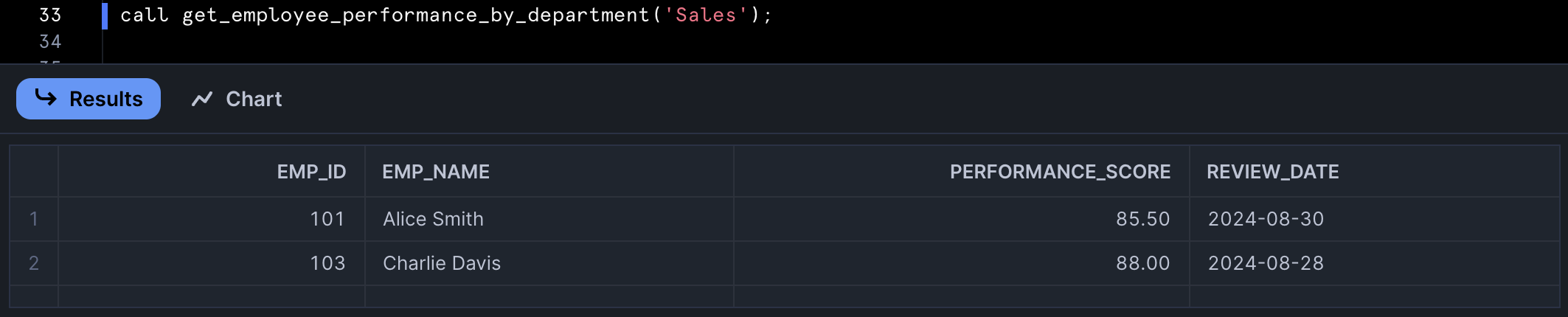
Task 3: Run a SELECT query that uses the TABLE() function to call the stored procedure in the FROM clause and retrieve the employee performance data for the Sales department.