Week 149 - SQL & Query Techniques

Snowflake SQL Chaining Challenge
A rather small release from Summit has rather big impacts, so says Professor Frosty. Which one? Chaining SQL! What a glorious innovation! You can query the results of queries in chained commands making life much easier than it ever has been.
For this challenge, you have the following stored procedure:
Stored Procedure DDL
CREATE OR REPLACE PROCEDURE gen_timeseries(start_date DATE, days INTEGER, category STRING, seed INTEGER)
RETURNS VARIANT
LANGUAGE PYTHON
RUNTIME_VERSION = '3.10'
PACKAGES = ('snowflake-snowpark-python', 'numpy')
HANDLER = 'run'
AS
$$
import numpy as np
import datetime

def run(session, start_date, days, category, seed):
    # Make the RNG deterministic for reproducibility
    rng = np.random.default_rng(int(seed) if seed is not None else 42)
    base = datetime.date.fromisoformat(str(start_date))
    rows = []

    # Start at 100 and add small Gaussian noise each day
    value = 100.0
    for i in range(int(days)):
        day = base + datetime.timedelta(days=i)
        value = max(0.0, value + float(rng.normal(0, 3)))  # keep non-negative
        rows.append({
            "date": str(day),
            "category": category,
            "value": round(value, 2)
        })

    # Compute a 3-day trailing moving average
    for i, r in enumerate(rows):
        window = rows[max(0, i-2):i+1]
        ma = sum(x["value"] for x in window) / len(window)
        r["moving_avg"] = round(ma, 2)
        r["day_index"] = i + 1

    return {
        "meta": {
            "start_date": str(base),
            "days": int(days),
            "category": category
        },
        "rows": rows
    }
$$;
Input Parameters
start_date DATE
- The first date in the time series.
- Example:
'2025-04-01'→ first row will be 2025-04-01.
days INTEGER
- How many rows (days) to generate starting from
start_date. - Example:
7→ generates 7 rows, from Apr 1 through Apr 7.
category STRING
- A label that will be attached to every row, so you can distinguish multiple runs.
- Example:
'WIDGETS'→ every row will include"category": "WIDGETS".
seed INTEGER
- Seed for the random number generator.
- Makes the random output reproducible: same seed → same sequence of random noise.
- Example:
123→ if you call again with seed 123, you’ll get the exact same dataset.
The Task
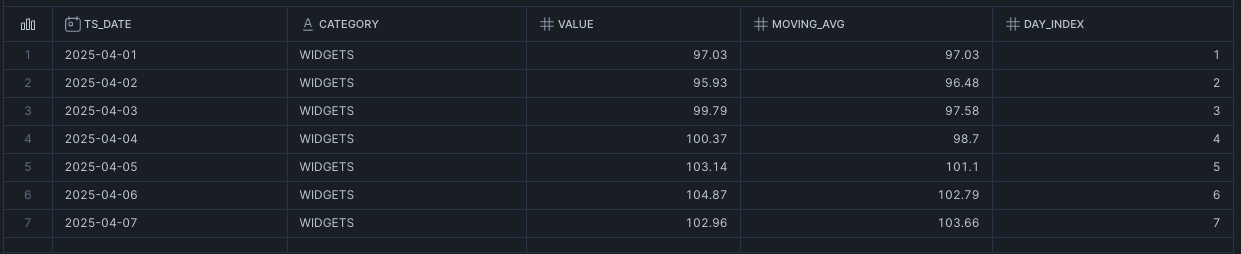
Your task is to parse the JSON using chained commands! Call the procedure as below:
CALL gen_timeseries('2025-04-01'::DATE, 7, 'WIDGETS', 123)And then try to get this result: